
Enterprise resource planning software

From formulation
to business decisions.

RAAP ERP brings finance, inventory, sales, production and HR tools into one Persian-language environment, helping teams follow the relationships between materials, processes and organizational records.

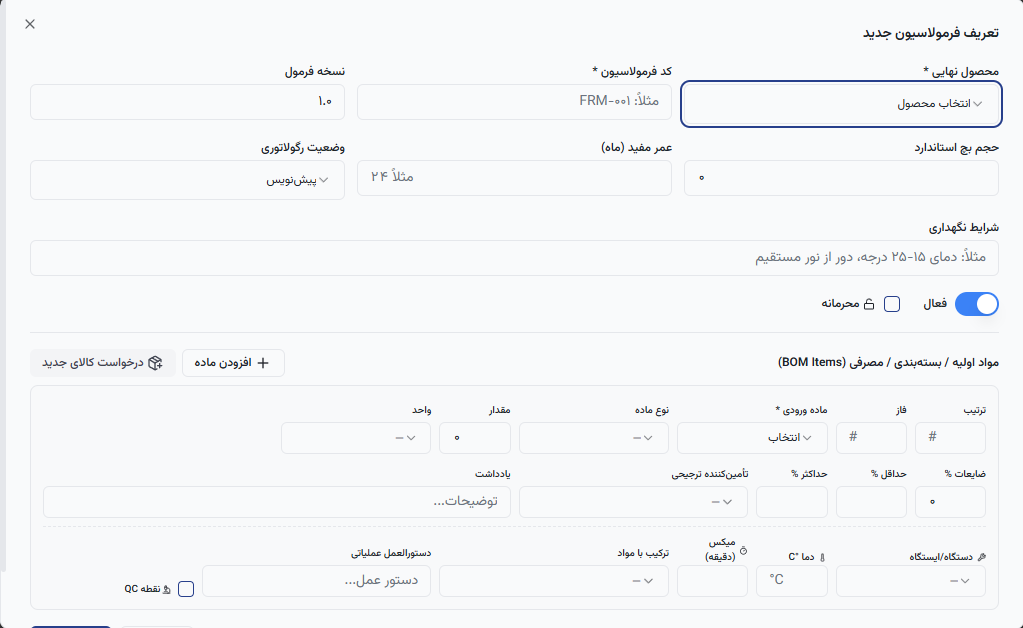
RAAP ERP formulation form with material and production parameters; interface shown in Persian Enlarge interface
The actual formulation form in RAAP ERP

Production begins with the formula's details.

Raw materials and instructions alongside product specifications.

RAAP's formulation section defines the formula version, batch volume, raw materials and packaging in one form. Each material has separate fields for quantity, unit, waste and supplier.

Operating instructions, temperature, mixing time and the quality control point are part of the same workflow. This structure turns scattered descriptions into specific information for the production team.

Different functions, one workspace

RAAP's organization menu provides a clear route to each department's tools.

Finance, sales and customers

Finance and accounting, sales and CRM modules sit alongside each other. Users access each department's workspace from a shared menu.

Procurement, inventory and production

Procurement, inventory management, product engineering and production planning have their own sections in RAAP. Formulation, work centres and production routing sit within product engineering.

Quality control and research

Laboratory and quality control, and research and development, each have separate navigation routes so their specialist work has a place in the organizational structure.

Reports and approvals

The BI report builder supports data-source selection, grouping and chart types. The approvals inbox gives users a way to handle operational items.

Start implementation with how the work happens.

  1. 01

    Understand the organization

    Identify the departments, roles and processes that need to move into the system.

  2. 02

    Prepare the information

    Review product and material master data, business partners and access permissions.

  3. 03

    Define the implementation scope

    Agree the rollout sequence and requirements for connecting existing systems with the RAAP team.

Explore organizational use

RAAP for your organization

Describe your industry, priority processes and current systems so the implementation discussion starts with your specific needs.

Discuss RAAP implementationTrack a request